Quick note: DualTemp™ is an optional temperature layer. Not every Sleep Number® bed has a DualTemp™ Layer.
Clean your DualTemp™ Layer as needed to keep the surface fresh and help maintain performance.
Before you start
You’ll need:
- A soft cloth
- Mild soap or detergent
- Water
- A clean, dry towel
Turn off and unplug the DualTemp™ control unit before cleaning.
Step 1: Prepare your Mattress
- Remove sheets, blankets and bedding.
- Turn off and unplug the DualTemp™ control unit.
Step 2: Identify your DualTemp™ active layer
Look at where the hose connects to your active layer. The hose location tells you which cleaning instructions to use.
If the hose is near the middle of the bed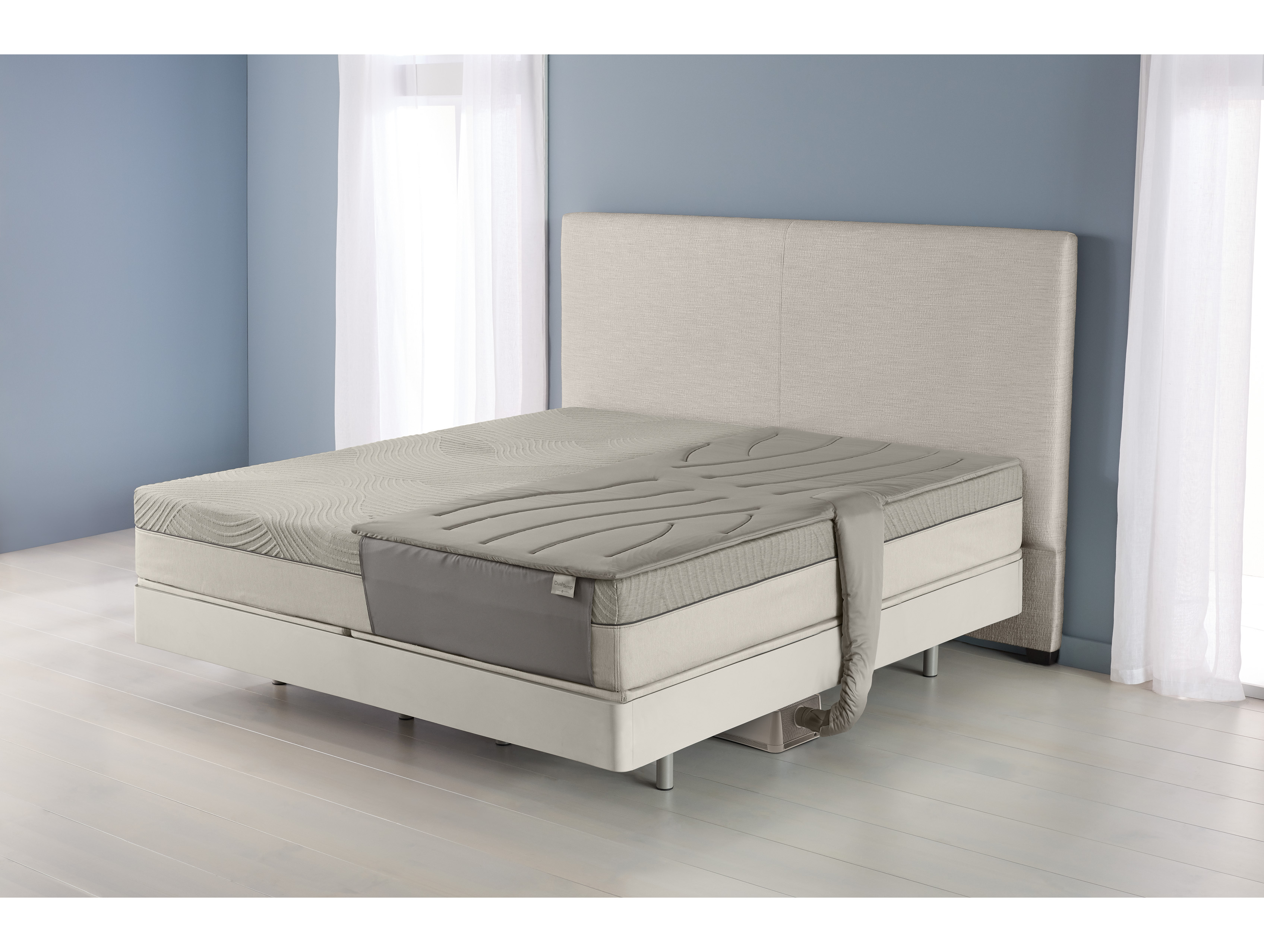
- Spot clean the active layer with warm, soapy water.
- Use a gentle detergent, such as mild dish soap or Woolite.
- Blot the area. Do not soak the active layer.
- Air dry completely before using it again.
Do not machine wash, dry clean, tumble dry, or saturate this active layer. Too much water can damage the layer.
If the hose is near the head or foot of the bed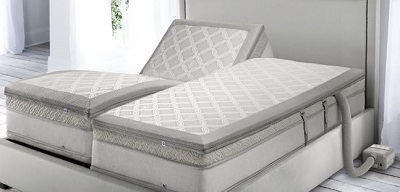
This active layer has a removable, machine-washable cover. The bottom half of the active layer and the foam are spot clean only.
How to wash the DualTemp™ cover
- Unzip and remove the cover.
- Machine wash on a gentle cycle with cold water and mild detergent.
- Air dry completely before putting the cover back on.
How to spot clean the DualTemp™ active layer and foam
- Spot clean with warm, soapy water.
- Use a gentle detergent, such as mild dish soap or Woolite.
- Blot the area. Do not soak the active layer or foam.
- Air dry completely before putting the cover back on.
Do not machine wash, dry clean, tumble dry, or saturate the active layer or foam.
- If a stain does not come out with warm, soapy water, do not use bleach or harsh stain removers because they may damage the material.
Step 3: Identify and clean your DualTemp™ fan
Cleaning instructions depend on whether you have a gray or a white DualTemp™ fan.
How to clean a gray DualTemp™ fan
- Unplug the fan.
- Wipe the outside of the fan with a clean, dry cloth.
- Use a vacuum attachment to clean the metal mesh and vents.
- Clean the mesh and vents every three months to help prevent dust buildup and airflow blockage.
Important: Do not take the gray DualTemp™ fan apart. The gray fan does not have removable filters. Cleaning the outside mesh and vents is the recommended cleaning method.
How to clean a white DualTemp™ fan and filters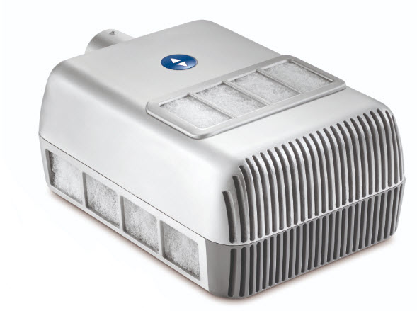
Clean or replace white DualTemp™ fan filters every six months. Replacement filters can be ordered online.
- Unplug the fan.
- Remove the magnetic filter covers.
- Remove the filters from the fan.
- Hand wash the filters with warm, soapy water. We recommend dish soap.
- Rinse with clean water.
- Air dry the filters completely before reinstalling them.
If your DualTemp™ layer is not cooling
If your DualTemp™ layer is not cooling, clean the fan vents, mesh, or filters first. Dust buildup can reduce airflow and cooling performance.
- Make sure the fan is plugged in and powered on.
- Check that the hose is connected securely to the fan and active layer.
- Make sure the fan intake and vents are not blocked by bedding, furniture, or dust.
- Clean the fan using the steps for your model.
- Let cleaned filters dry completely before reinstalling them.
If the DualTemp™ layer still does not blow cool air, only blows warm air, or the Cool and Fan settings feel the same after cleaning, contact us for help. Your fan, hose, or active layer may need additional troubleshooting.
Replacement parts and model help
If your DualTemp™ layer foam is deteriorating, do not continue using damaged foam. Contact us to check replacement options for your model.
|
Call Customer Support Mon - Fri: 8AM - 8PM CT, Saturday: 8:30AM - 5PM CT Call 1-800-472-7185 |
Chat Support Available 7 days a week: 6AM - 11 PM CT Click/tap the "Chat" icon in the lower right corner of your device screen. |
If your DualTemp™ system looks different from the examples in this article, do not take the unit apart unless the step specifically tells you to. Use the hose location and fan color to choose the closest cleaning instructions, or contact us for help identifying your model.
Frequently Asked Questions
Can I use bleach?
No. Do not use bleach or harsh cleaners.
How long should the layer dry?
Let the layer air dry completely before adding bedding or turning the system back on.
Should I clean the filter when I clean the layer?
Yes. Checking the filter during cleaning can help keep airflow working properly.
What should I do if I have allergen concerns?
For dust mite concerns, wash the removable cover if your model has one, vacuum around the bed and fan area, and spot clean the active layer as directed. The active layer and foam should not be soaked or machine washed.