Applies to Adjustable (non-smart) Bases, sold January 2026 and on. These bases are controlled by remote control only.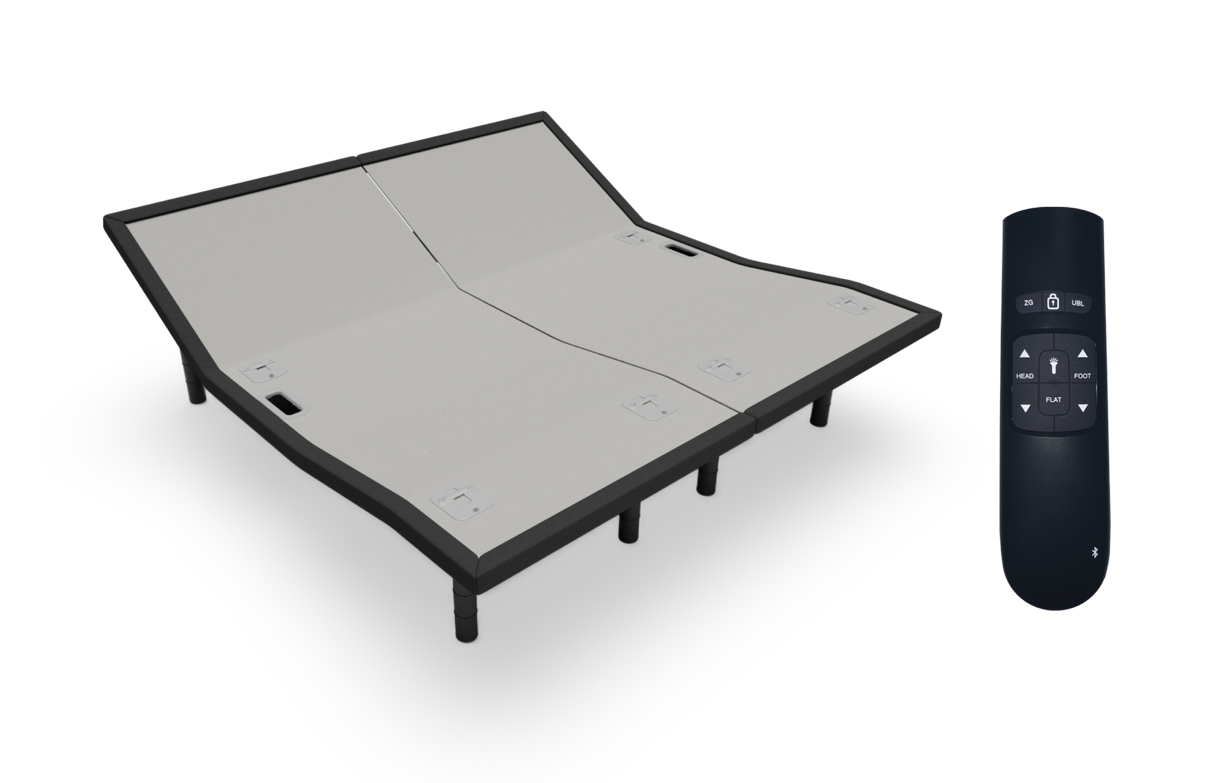
Click to download the user guide:
Adjustable Base Remote User Guide
Quick Answers
How do I adjust my bed using my Sleep Number Adjustable Base with Remote?
Use the remote buttons: Head Up/Down or Foot Up/Down to move your bed.
How do I return the Sleep Number Adjustable Base to flat?
Press the Flat button once.
How do I reset or reprogram positions on my Sleep Number Adjustable Base with Remote?
Adjust your bed, then press and hold the Flashlight button for 6 seconds, then press your desired preset button.
Remote Button Guide
| Button | What it does |
| Head Up/Down | Raises or lowers the head section |
| Foot Up/Down | Raises or lowers the foot section |
| Flat | Returns bed to a flat position |
| Zero Gravity (ZG) | Moves to a pre-set comfort position |
| Underbed Light | Turns light on or off |
| Flashlight | Turns light on for 30 seconds |
| Lock | Locks/unlocks remote (hold 5 seconds) |
Step-by-Step: Reprogram a Preset (ZG Position)
- Adjust your bed to your desired position.
- Set underbed light if desired.
- Press and hold the Flashlight button for 6 seconds.
- When the remote light flashes, press ZG within 2 seconds.
- Listen for a beep to confirm.
Your position is now saved.
Step-by-Step: Lock or Unlock Your Remote
- Press and hold the Lock button for 5 seconds.
- Wait for the backlight to flash 3 times.
Your remote is now locked or unlocked.
Step-by-Step: Change Control Mode
Press & Hold Mode
- Press and hold Flat + Flashlight for 3 seconds.
- Wait for the light to flash 3 times.
Press & Release Mode
- Press and hold Lock + Flashlight for 3 seconds.
- Wait for the light to flash once.
Note: This will reset saved positions to default.
Step-by-Step: Pairing 1 Remote to 1 Base
- Press and hold Head Up + Foot Down until light flashes.
- Unplug the base.
- Wait 3 minutes, then plug it back in.
- Within 1 minute, press and hold Head Down + Foot Up until light flashes.
- Test the remote.
Remote is now paired to the base.
Step-by-Step: Pairing 1 or 2 Remotes to 2 Bases
- Complete steps above.
- Lower both to flat.
- Unplug both bases.
- Connect sync cable between both control boxes.
- Plug both bases back in.
- Test with remote.
Both bases should now move together.
What to Expect
- Remote uses 2 AAA batteries.
- Backlight flashes confirm actions.
- Bed may beep when saving positions.
- Some actions have a time window (1 minute).
Troubleshooting
Bed not responding
- Reprogram the remote.
- Unplug base for 30 seconds and reconnect.
- Check power source or breaker.
Bed won’t return to flat
- Check for obstructions.
- Ensure it’s not too close to the wall.
Excessive noise
- Make sure bed isn’t touching walls or furniture.
- Slightly adjust position to realign motors.
Power Outage: Lower Bed to Flat
Applies to lower the bed only during a power outage. Do not put batteries in power brick unless necessary.
- Insert 2 (9V) batteries into the power supply.
- Press Flat on the remote.
- Remove batteries after use.
Batteries are single-use only.